
A customer called me last month convinced her washer was “possessed.” Every light on the panel was blinking at once, the machine had stopped mid-cycle, and she had already unplugged and replugged it three times hoping that would fix it. It turned out to be a simple lid switch that wasn’t engaging properly, but I understood the panic. Most top-load washers, especially the newer Samsung models common in Dubai homes, don’t show a plain error message. They tell you what’s wrong through combinations of lights, and if you don’t know the system, it looks like the machine is just malfunctioning at random.
It isn’t random. Once you know what each light or light combination is actually reporting, most panels become fairly easy to read without opening a manual every time. This guide covers what the lights on a typical top-load washer are telling you, what’s normal during a wash, and when a pattern means you need a washing machine technician rather than a reset.
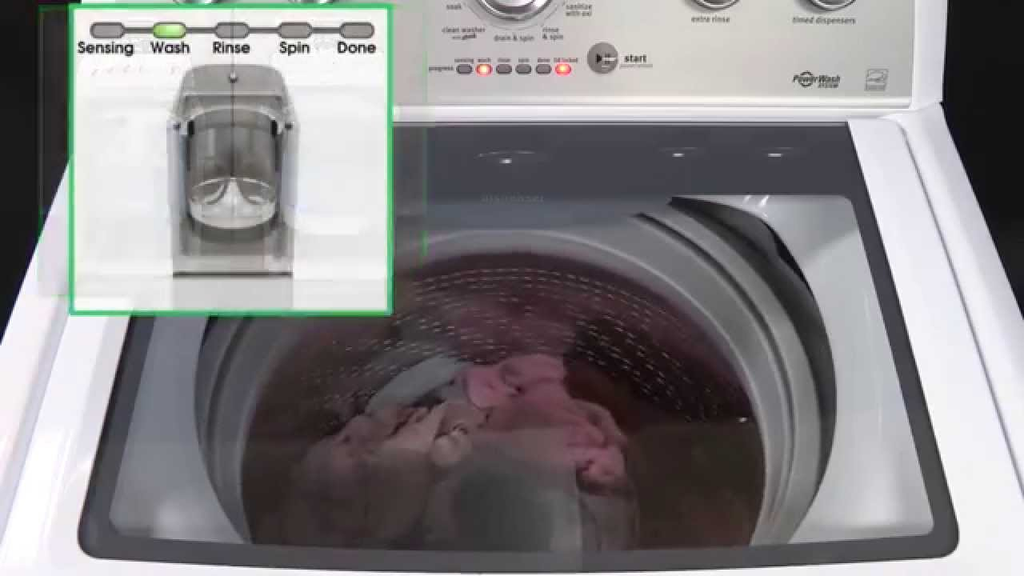
What Do the Status Lights on a Top-Load Washer Mean?
On most top-load washers without a digital error display, indicator lights represent cycle stages, water temperature, water level, and door or lid status. A single light staying on usually reflects a normal selection or stage of the cycle. Lights blinking together, especially combinations of temperature and water-level indicators, are the machine’s way of reporting a specific fault, such as a door that isn’t locked, water that isn’t filling or draining, or an unbalanced load. The exact meaning of a blinking combination depends on the brand and model, so it’s worth checking your own manual or the manufacturer’s official code chart before assuming the worst.
Common Status Lights and What They Usually Tell You
Power or Standby Light
This light simply confirms the machine has power and is ready to accept a cycle selection. If it’s on but nothing else responds when you press start, the issue is more likely the control lock, the lid switch, or the start button itself than the light.
Lid Lock or Door Light
Top-load washers won’t spin unless the lid lock engages. A steady lid lock light usually means it’s locked and safe to run. A light that blinks or won’t turn on at all often points to the lid not closing fully, an obstruction around the latch, or a failing lid switch. This is one of the most common reasons a wash stops mid-cycle with no visible fault beyond the flashing light.
Wash Cycle Progress Lights
Most panels light up sequentially through wash, rinse, and spin as the cycle moves along. These are informational, not warnings. If the machine seems stuck showing the same stage for far longer than expected, that’s worth noting, but the light itself isn’t reporting an error on its own.
End of Cycle Light
A steady or slowly blinking light at the end of a cycle just tells you the load is done and ready to be removed. On some models it will stay lit for a set period before turning off automatically.
Self Clean or Maintenance Reminder Light
Many Samsung top-load washers include a self clean reminder light that turns on periodically, not because something is broken, but because the machine is due for its own maintenance wash. Running the self clean cycle and periodically cleaning the drum resets it. This ties directly into regular washing machine maintenance, and ignoring it repeatedly is one of the more common reasons clothes start coming out of the wash still smelling musty or looking dull.
Blinking Temperature and Water Level Lights
This is where most confusion happens. On washers that use temperature and water-level indicators instead of a digital code, Samsung’s own troubleshooting documentation confirms that specific blinking combinations point to specific faults, including the door or lid not being detected as closed, water not filling correctly, water not draining, hot and cold supply hoses being swapped, an overflow condition, or an unbalanced load. Samsung is also clear that lights blinking during normal operation are not automatically an error; it only points to a real fault when the wash has actually stopped working, such as halting mid-cycle.
When Is a Blinking Light Normal, and When Is It a Fault?
The simplest test I use on a service call is whether the washer is still functioning. If lights are cycling or blinking but the machine is filling, agitating, draining, and spinning as expected, that’s typically normal operation or a reminder, not a fault. If the washer has stopped doing its job (it won’t fill, won’t drain, won’t lock the lid, or halts mid-cycle) and the lights are blinking at the same time, that combination is the machine reporting an actual problem.
What to Do When You See an Unfamiliar Light Pattern
A few steps are safe to try before calling anyone out:
- Check that the lid is fully closed and nothing is caught in the latch.
- Confirm the water supply taps are open and both hoses are connected correctly.
- Check that the machine isn’t overloaded, since an unbalanced load is a common trigger for a fault light.
- Power the washer off at the socket for a few minutes, then restart it, since this clears some temporary fault signals.
- Compare the light combination against the code chart in your washer’s manual or your model’s page on the manufacturer’s support site.
Avoid repeatedly cycling the power or forcing the lid open if it’s genuinely locked. That can damage the lid switch and turn a simple fault into a repair job.
When Should You Call a Washing Machine Repair Technician?
If a fault light keeps returning after you’ve checked the lid, water supply, and load size, or the same light pattern appears every time you try to start a cycle, it’s time to bring in a washing machine technician rather than keep resetting the machine. The same applies if you notice grinding noises, the drum won’t spin, water is leaking underneath the unit, or the machine won’t drain at all. Homeowners searching for Samsung washing machine repair near me or washing machine repair nearby should look for a technician who reads the actual fault pattern and confirms it with a proper inspection, rather than guessing at parts based on the blinking lights alone.
FixFast LLC
FixFast LLC is a home appliance repair and maintenance company serving customers across Dubai. Our technicians deal with exactly this kind of diagnosis on a regular basis: working out whether a blinking light is routine, a reminder, or a genuine fault before recommending any repair. It’s the same troubleshooting approach we use for washing machine repair, and it applies whether the machine is refusing to lock its lid, failing to drain, or simply confusing its owner with a panel full of flashing lights. Appliances with digital panels aren’t unique to laundry either; dishwasher repair and cooking range repair calls often start with the same kind of “what does this light mean” question.
If your top-load washer keeps flashing the same light pattern or has stopped completing a cycle, FixFast LLC can check whether it’s something you can safely clear yourself or a fault that needs a proper repair. You can see our full range of appliance repair services, including refrigerator repair and dryer repair, on our site.
For the manufacturer’s own reference on washing machine light patterns and error codes, see Samsung’s official washing machine troubleshooting guide.
Frequently Asked Questions
Why are all the lights on my top-load washer blinking at once? This usually means the machine has detected a fault, such as a lid that isn’t locking, a water supply or drainage problem, or an unbalanced load, and has stopped the cycle to report it. Check the lid, water taps, and load size before assuming it needs a repair.
Is a blinking light always an error? No. Cycle progress lights and reminder lights, like a self clean indicator, blink as part of normal operation. It’s only a fault if the washer has also stopped working properly, such as halting mid-cycle.
What does the self clean light mean on a Samsung washer? It’s a maintenance reminder, not a malfunction. It means the machine is due for a self clean cycle to reduce detergent buildup and odour, and it should turn off once that cycle is run.
Can I fix a blinking light myself? Often, yes. Closing the lid fully, checking the water supply, reducing an overloaded wash, or restarting the machine clears many light faults. If the same pattern keeps returning, it’s a sign of a real fault rather than something you can clear by resetting.
Do all top-load washers use the same light codes? No. Light combinations vary by brand and sometimes by model, so always check your own washer’s manual or the manufacturer’s official code chart rather than assuming the pattern matches a different machine.
When should I call a repair technician instead of resetting the washer? Call a technician if a fault light returns after checking the lid, water supply, and load, or if it’s paired with grinding noises, a drum that won’t spin, leaking, or a washer that won’t drain.